Chrome Extension
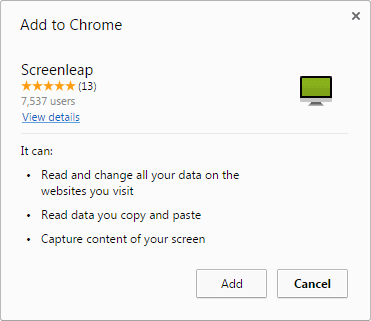
Desktop users on platforms that support the Google Chrome browser can share their screen by installing our Chrome extension. You will have the option of sharing your entire screen or just a browser tab. Like desktop screen sharing, your viewers will be able to view your shared browser window from any device with a web browser (including tablets and smartphones) without having to download or install any additional software.
Use of the browser extension is subject to the terms of the Browser Extension License.
Installation
Features
Chromebook-Ready
Our browser extension works on Chromebook, so Chromebook users now have another option for sharing their browser windows. Unlike the existing options, Screenleap’s browser extension allows your viewers to view your shared browser window or screen without needing to install a plugin, or sign up for an account.
We recommend that you have at least 4GB of RAM on your Chromebooks to ensure that you have adequate resources for screen sharing to function optimally and without issues. The browser extension works with less than that but you may run into issues if you have a lot of other tabs open while sharing.
Desktop SharingBrowser extension users also have the ability to share their entire desktop, a specific application, or a specific window. Once you start your screen share, you will be prompted to select what you want to share.
Quick Start Guide
Sharing
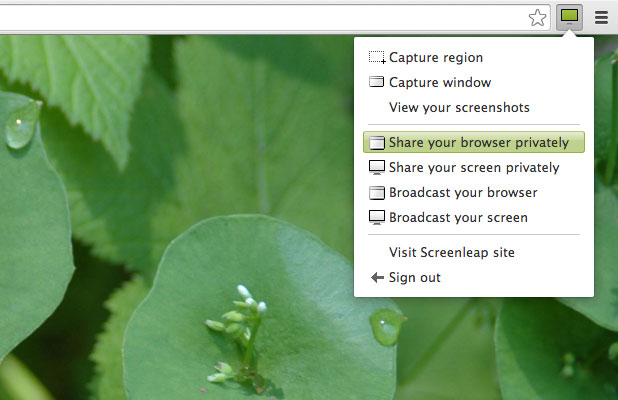
To start sharing, click on the
 browser extension button to the right of your address bar and choose one of the 4 sharing options:
- Share your browser privately - Share your browser window that is viewable by going to a unique URL or entering a unique 9-digit number.
- Share your screen privately - Share your screen that is viewable by going to a unique URL or entering a unique 9-digit number.
- Broadcast your browser - Share your browser window that is viewable by going to your handle page.
- Broadcast your screen - Share your screen that is viewable by going to your handle page.
If you have not already signed in to the extension, you will be asked to sign in. You should only have to do this once. If you do not yet have a Screenleap account, click "Don't have an account?" to quickly make a Free account.
Sharing Instructions
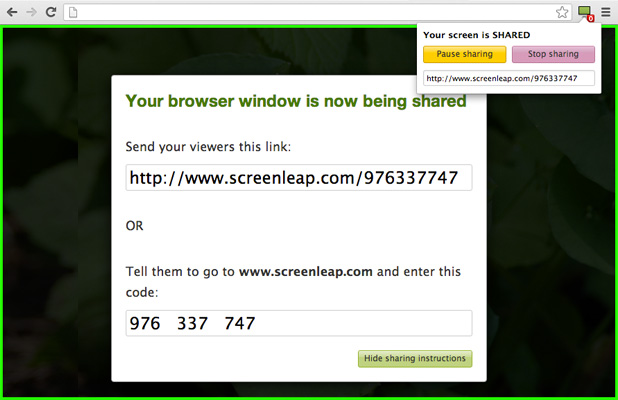
Each time you start a browser share you will be shown instructions telling you how to give other people access to your browser share. You can tell your viewers the displayed share code over the phone or send them a link that they can click on.
Active Tab
While you are sharing, A green border will appear around the web page that is being shared. If you switch between tabs, the green rectangle will move to the new shared tab.
Viewer Count
The Screenleap extension button will show you the number of people viewing your browser share. If there is no number displayed, it means that your browser is not being shared.
Console
You can control your browser share from the console. To open the console, click on the Screenleap extension button. From the console, you can pause and stop sharing. You can also click the link button to the left of the pause button to view the sharing instructions again.
Limitations
The browser share extension currently has the following limitations:
- Multiple monitors are only supported if they all have the same device pixel ratios. For example, all the monitors need to be retina/HiDPI or they all need to be normal DPI monitors.
- When you are sharing your browser window, your mouse cursor will only update if your Chrome window is the active window. If you click to another app and don't click back on the Chrome window, your viewers will not see your mouse movement even if you move it over the browser window.
- When you are sharing your browser window, your mouse cursor will only update if your mouse cursor is not over an iframe.
- When you are sharing your browser window, the available options will not be visible to your viewers when you click on a select form element.
